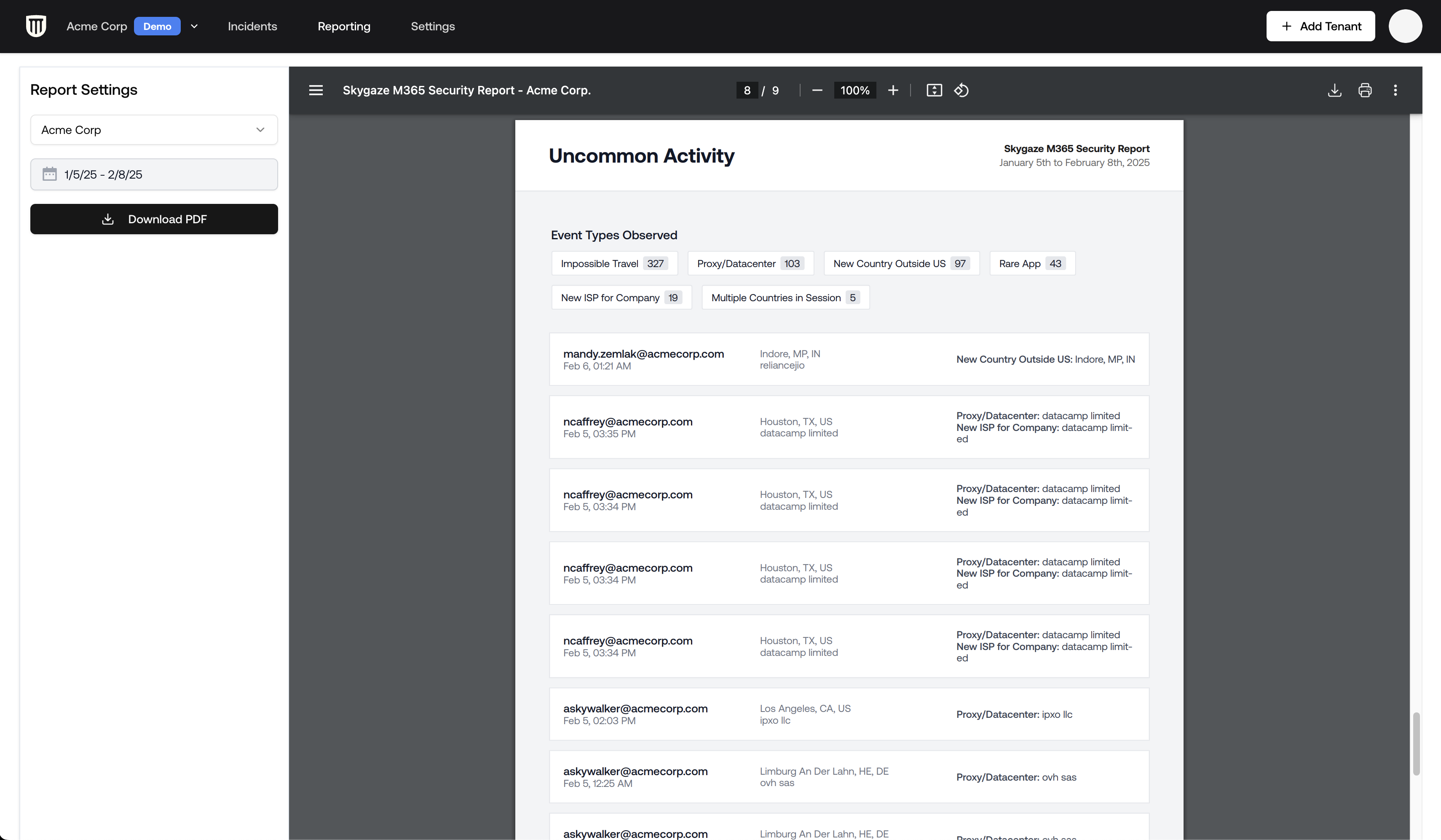
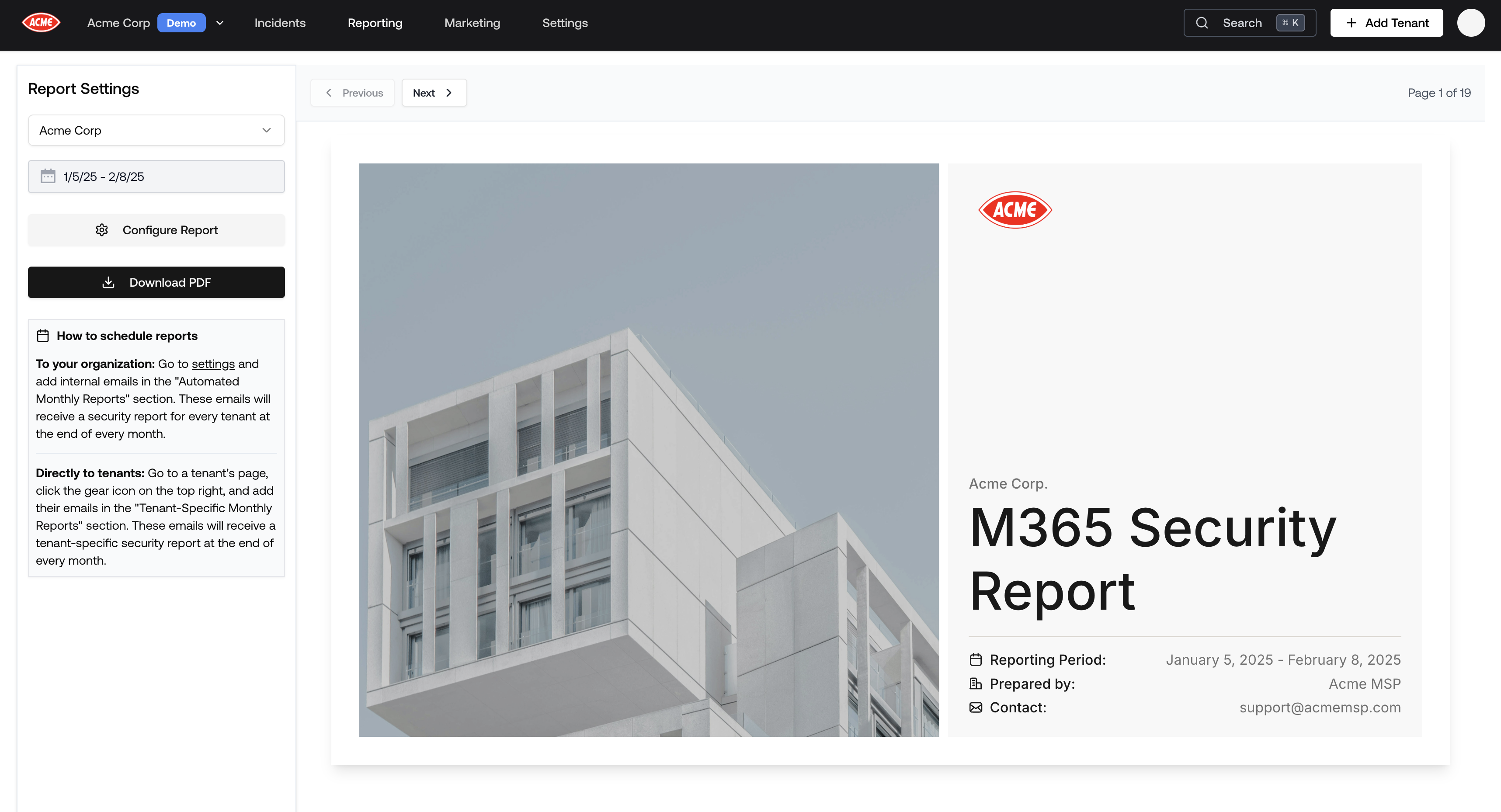
Everything Petra identifies, including M365 incidents, failed attacks, uncommon activities, and spotlighted investigations can be compiled into a white-labeled PDF report.
The PDF includes your organization’s branding (logo, name, contact email, and currency) along with:
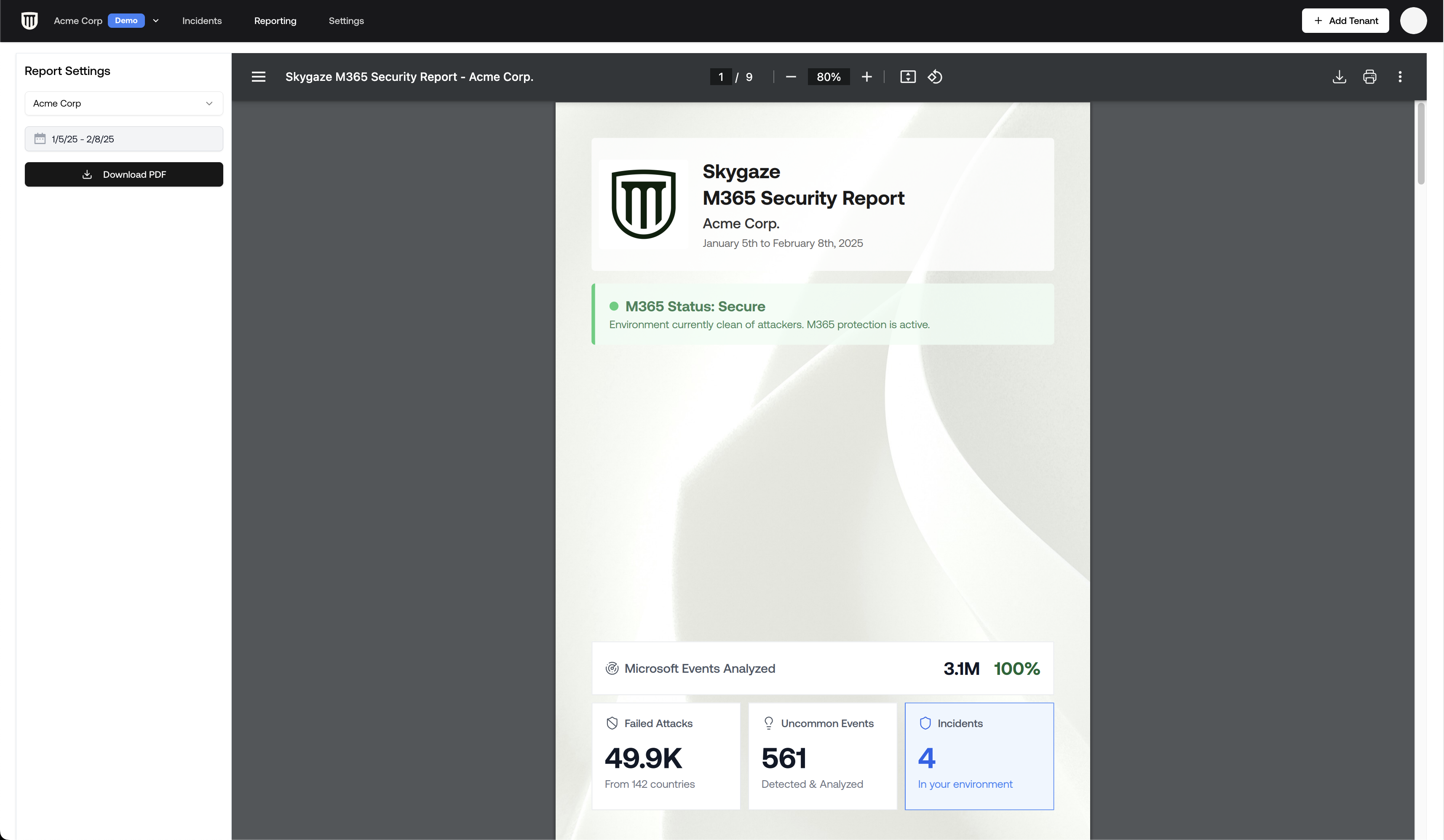
Executive Summary: A high-level overview of the tenant’s security posture for the selected period.
Summary Metrics: Number of analyzed events, identified failed attacks, involved countries, uncommon activities, and detected incidents.
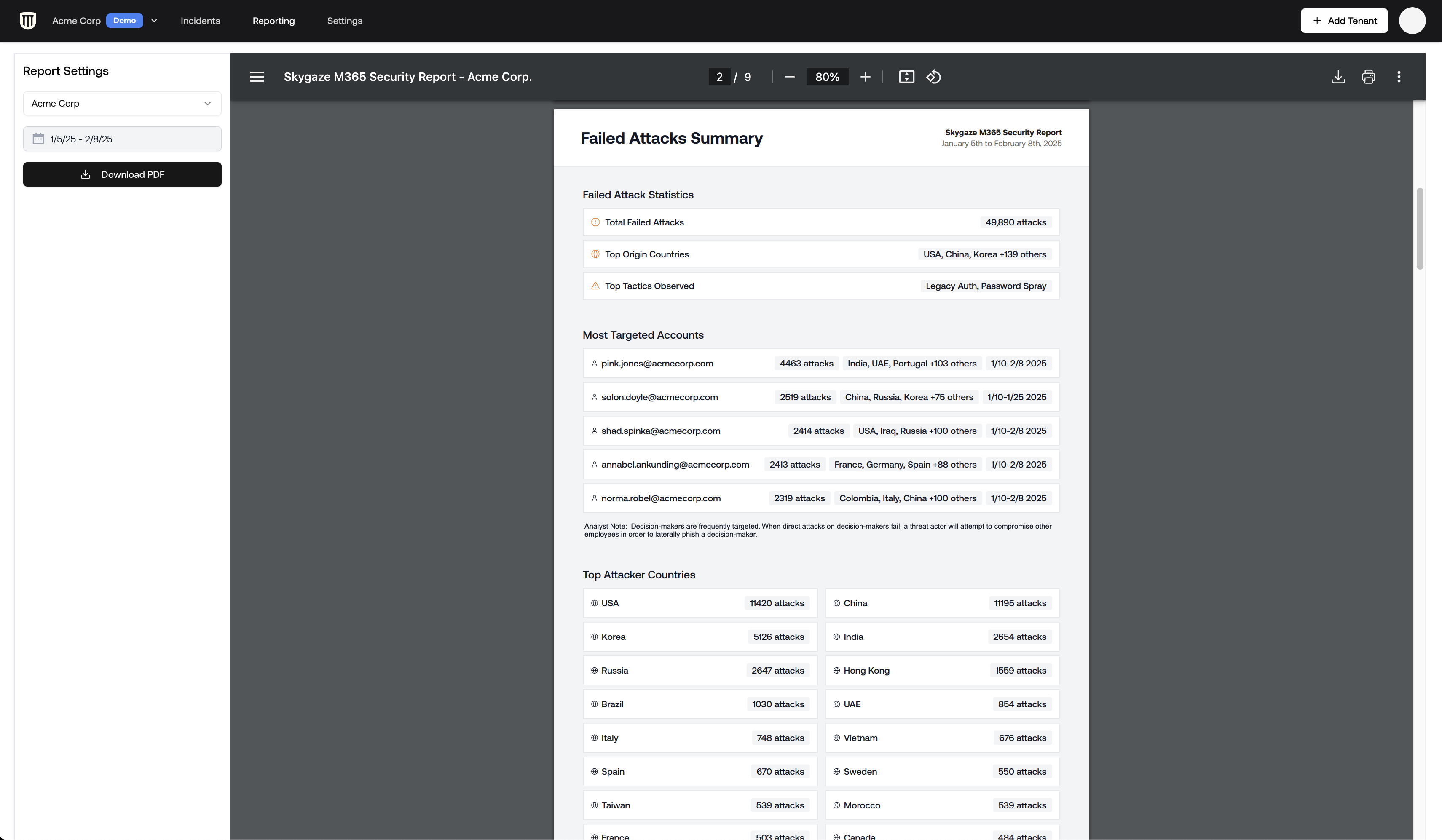
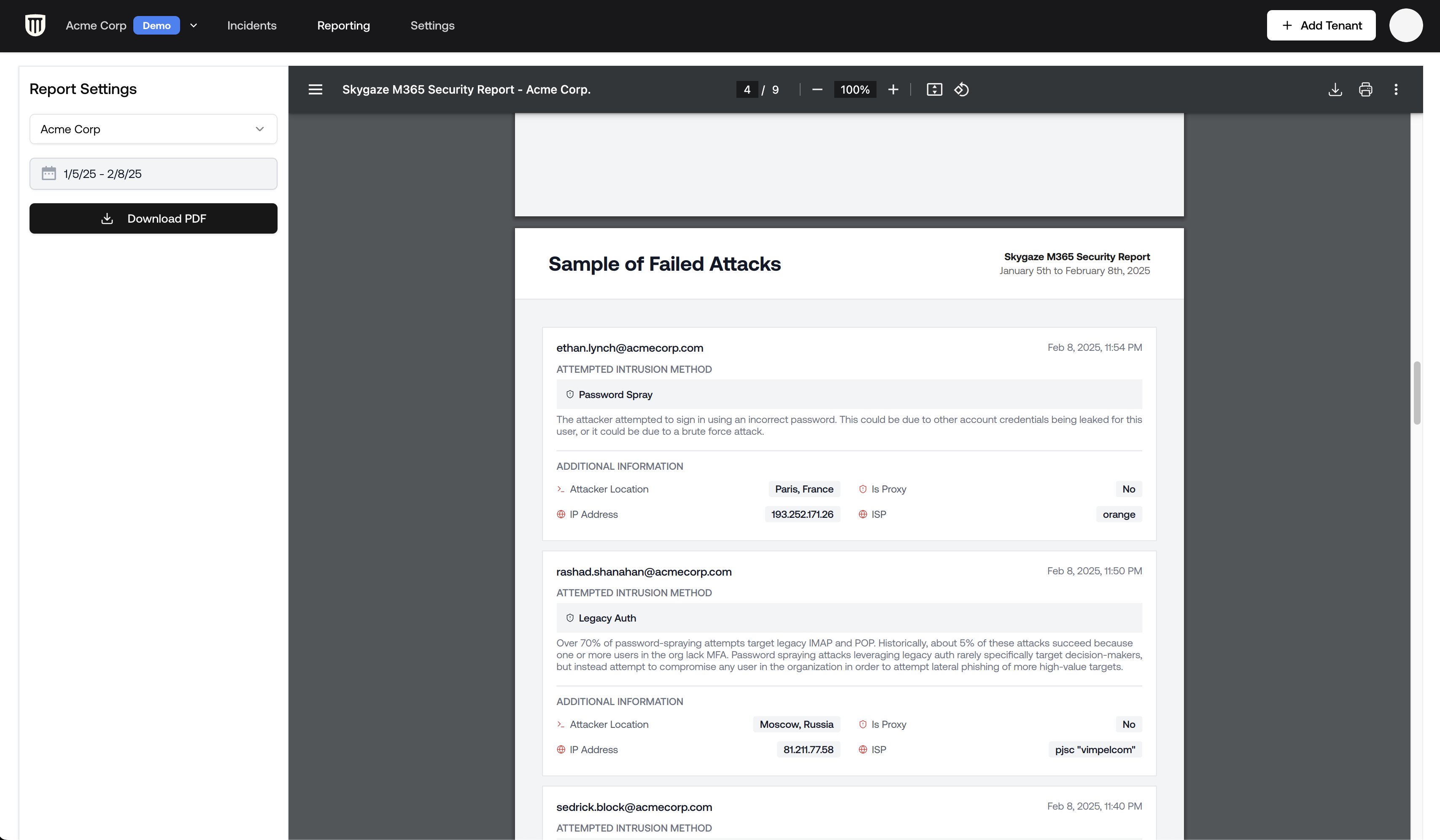
Failed Attacks: Specifics on targeted accounts, countries involved, and detailed insights into each unsuccessful intrusion attempt.
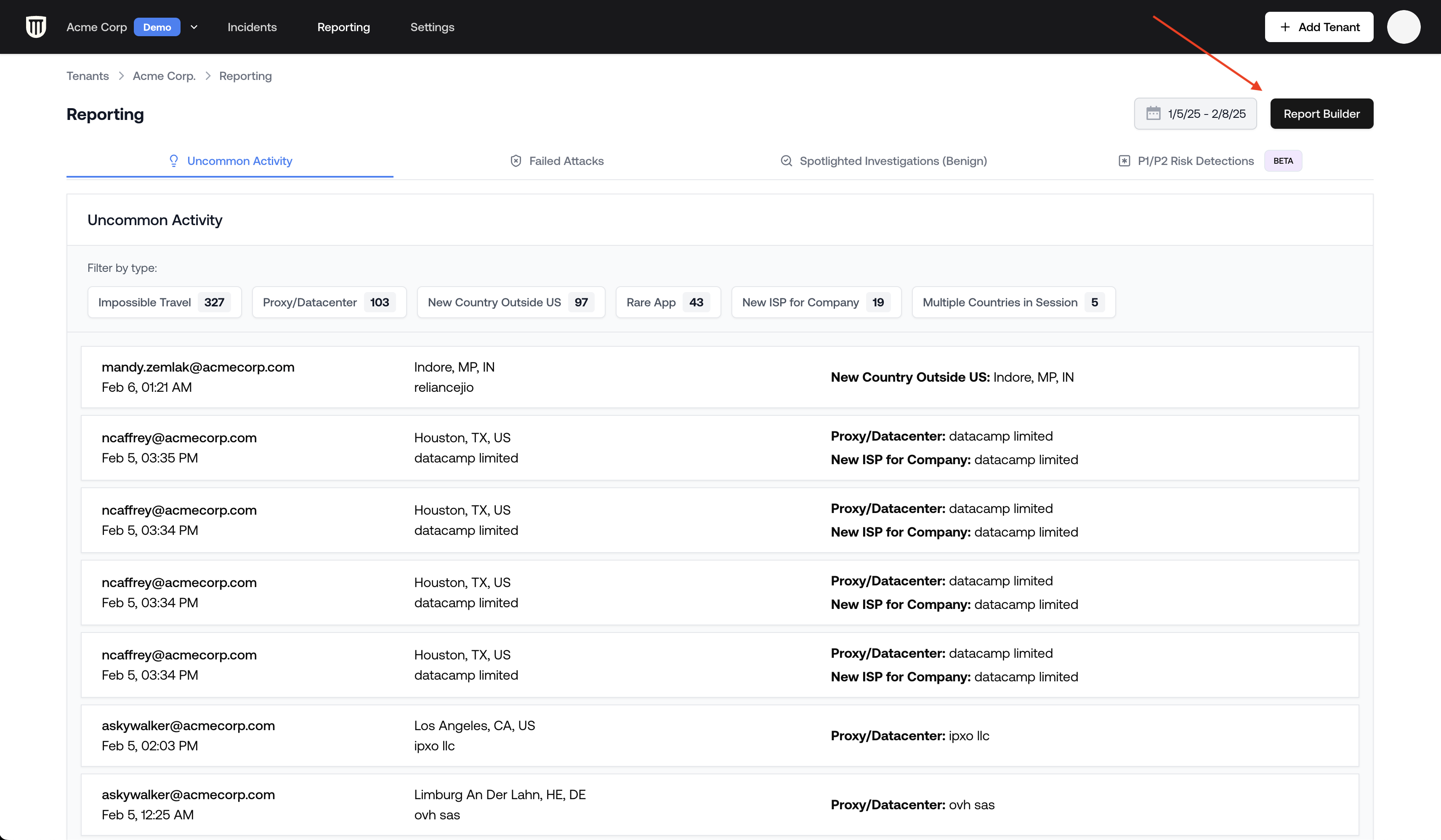
Uncommon Activity: Anomalous activities that indicate unusual behavior but are not incidents. These make great talking points or launchpads for hardening initiatives.
Spotlighted Investigations: Detailed analyses conducted by the Petra security team.
Incidents: Any incidents that occurred during the report period. Full incident reports are included in the appendix.
Investigated Activity (optional): Unusual login patterns and detection types that were investigated. See Configuring Report Content.
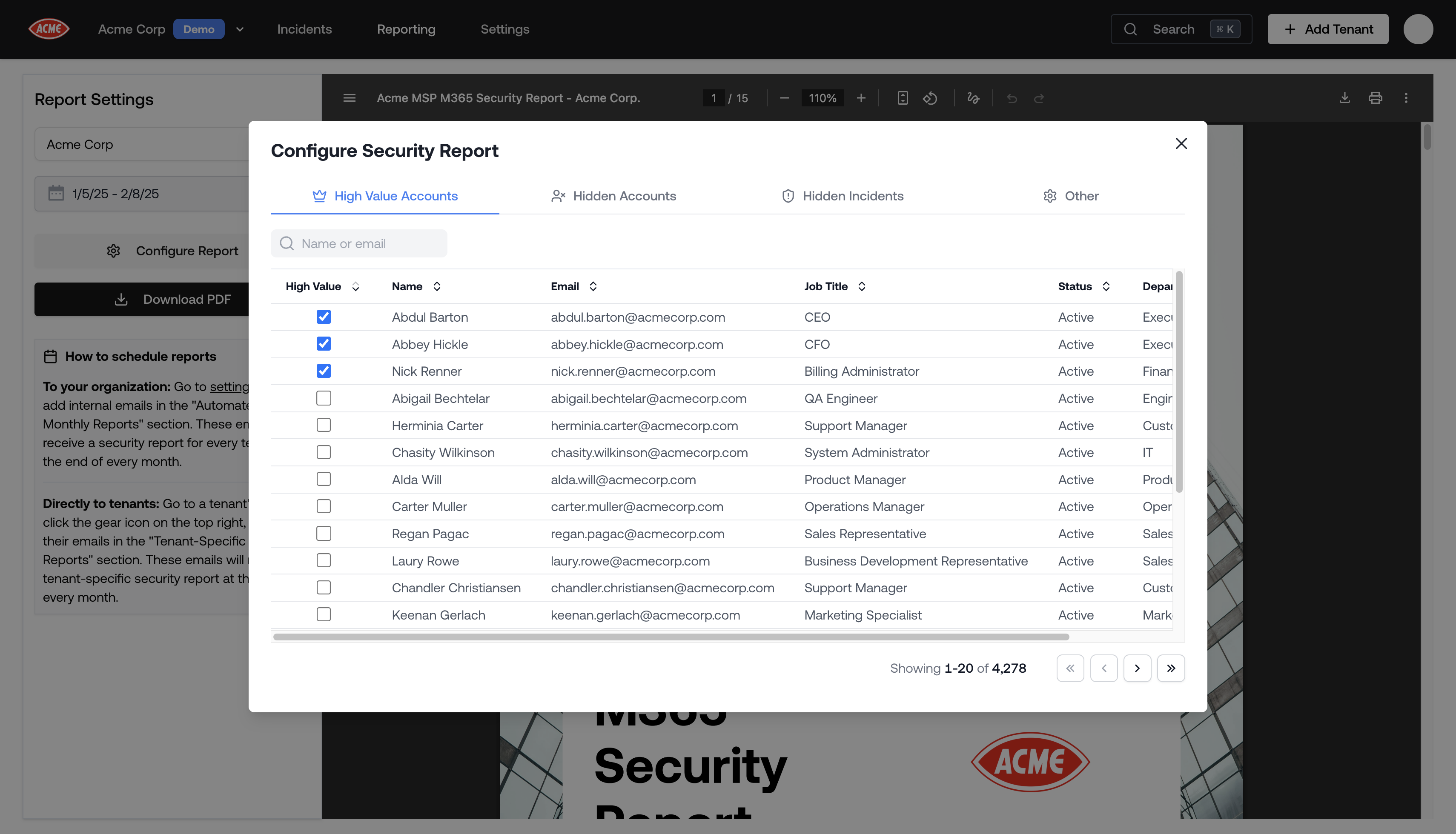
Tag accounts like CEO, CFO, or billing managers as high value. High value accounts receive greater detail in the report, making it easy to show your client that their most important people are being watched.
Open the High Value Accounts tab in the configuration modal.
Search for a user by name or email.
Check the High Value checkbox next to the account.
Investigated Activity: Toggle whether the investigated activity section appears in reports, and select which detection types to include (Impossible Travel, New Country, New ASN, Proxy Datacenter, Rare App, Rare OS, and more).
Branding shortcut: A link to Settings → Branding where you can configure your logo and contact email (see Customizing Report Branding below).
Petra can automatically send tenant security reports on the first of every month, covering the entire previous month. There are two ways to set this up depending on who should receive them.
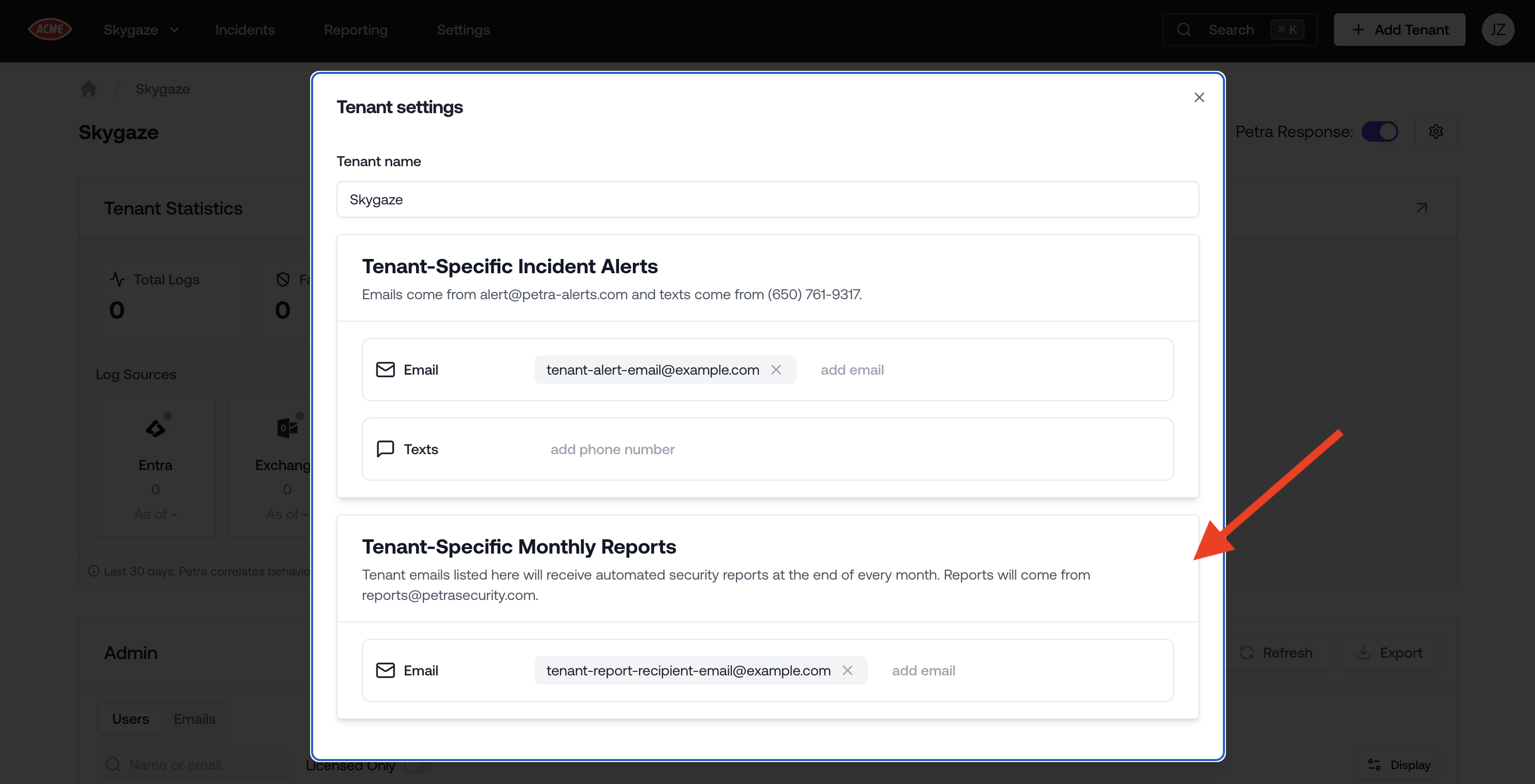
Add tenant-specific email addresses so your clients receive their own security report each month.
Navigate to the tenant’s page by clicking on the tenant from the Homepage.
Click the Settings (gear) icon to open the tenant settings modal.
Under Tenant-Specific Monthly Reports, add the client’s email address.
These recipients receive a PDF report for that specific tenant only. Reports are sent from reports@petrasecurity.com.
Monthly reports are a great way to demonstrate ongoing value to your clients. If you manage tenants on behalf of clients, see Co-Managed Tenants for how to give clients direct portal access alongside automated reports.
If you have configured a PDF Export Contact Email in Settings → Branding, it will be included as the reply-to address on tenant report emails so clients can respond directly to your organization.
Every automated monthly report that Petra has generated is available for download in the Reporting tab under the Automated Reports sub-tab. Reports are stored as ZIP files, each containing a PDF for every tenant included in that month’s run.
Navigate to the Reporting tab in the top navigation bar.
Click the Automated Reports tab.
Under Security Report Artifacts, find the report you want by date.
Click Download to get the ZIP file.
If you received a monthly report email with a download link, clicking it will take you directly to this tab and begin the download automatically.
Tenant reports are white-labeled with your organization’s branding. You can customize the logo, organization name, contact email, and currency that appear in every generated PDF.
Shown in generated PDFs so tenants can contact you with questions. Also used as the reply-to address for automated monthly report emails.
Reporting Timezone
The timezone used for all dates and timestamps in generated PDF reports. Dates and times in reports will be displayed according to this timezone setting.
Report Currency
The currency symbol used for monetary figures in PDF reports (for example, the “Why M365 protection matters” statistics). Supported values: $ (default), £, €, A$, C$, and NZ$. Amounts are adjusted for local purchasing power rather than raw exchange rates.
Navigation Bar Logo
Your logo in the Petra app’s navigation bar. Used as a fallback in PDFs if no PDF Export Logo is set.
PDF Export Logo
A dedicated logo for all PDF reports (tenant reports, threat remediation reports). If not set, the Navigation Bar Logo is used instead.
Max file size: 2 MB for the Navigation Bar Logo, 5 MB for the PDF Export Logo
Recommended: Use a high-resolution, square image for the PDF Export Logo so it renders clearly in reports
Upload methods: Click the upload area, drag and drop a file, or paste an image from your clipboard
{"docsConfig":{"theme":"mint","$schema":"https://mintlify.com/docs.json","name":"Petra Security Docs","colors":{"primary":"#AE6654","light":"#E1C09E","dark":"#AE6654"},"logo":{"light":"https://mintcdn.com/petrasecurity-7f411ce9/xhwggn1Webj24oba/logo/light-group.svg?fit=max\u0026auto=format\u0026n=xhwggn1Webj24oba\u0026q=85\u0026s=bcb6096cc95673da0210cd35cab62266","dark":"https://mintcdn.com/petrasecurity-7f411ce9/xhwggn1Webj24oba/logo/dark-group.svg?fit=max\u0026auto=format\u0026n=xhwggn1Webj24oba\u0026q=85\u0026s=291d7abdafea5c702cded7e0ccfe9109"},"favicon":"https://mintcdn.com/petrasecurity-7f411ce9/804PMvzD5nFDNqZk/favicon.png?fit=max\u0026auto=format\u0026n=804PMvzD5nFDNqZk\u0026q=85\u0026s=e8b9e056a6422ed2998faf9649a268c0","api":{"openapi":"api-reference/openapi.json","playground":{"display":"interactive"}},"navbar":{"links":[{"href":"https://www.petrasecurity.com/research","label":"Research"}],"primary":{"type":"button","label":"Dashboard","href":"https://app.petrasecurity.com"}},"seo":{"metatags":{"canonical":"https://www.petrasecurity.com/docs","robots":"index, follow"}},"integrations":{"posthog":{"apiKey":"phc_9Nbz8UiN0da62l0QMCrMSFxEprCHPQzLeDmUhMF9hG8"}},"styling":{"latex":false},"navigation":{"global":{"anchors":[{"anchor":"Research","icon":"newspaper","href":"https://www.petrasecurity.com/research"},{"anchor":"Support","icon":"envelope","href":"mailto:support@petrasecurity.com"}]},"pages":[]}},"deployment":{"deploymentMetadataValue":{"subdomain":"petrasecurity-7f411ce9","hasAudioNarration":false,"actualSubdomain":"petrasecurity-7f411ce9","customDomains":["docs.petrasecurity.com"],"gitSource":{"type":"github","owner":"petra-security","repo":"docs","deployBranch":"main","contentDirectory":"","isPrivate":true,"mountPath":"","label":""},"chroma":{"liveDeploymentHistoryId":"6ae4e2512a1bb30bba7f9d4e","collectionId":"26fd9ddb-1597-4165-85b5-1a0804c9f857","schemaVersion":"v3","latestBuiltDeploymentHistoryId":"6ae4e2512a1bb30bba7f9d4e"},"entitlements":{"AI_CHAT":{"status":"ENABLED"},"WEB_MCP":{"status":"ENABLED"},"NARRATION":{"status":"ENABLED"}},"buildId":"6aee63006689ddcee8208579","clientVersion":"0.0.4076","searchFilterCounts":[{"language":"default","tag":"Guides","count":43},{"language":"default","tag":"How to","count":32},{"language":"default","tag":"Get Started","count":9},{"language":"default","tag":"API Reference","count":9},{"language":"default","tag":"Settings","count":8},{"language":"default","tag":"Investigate","count":7},{"language":"default","tag":"Reporting","count":7},{"language":"default","tag":"Endpoints","count":6},{"language":"default","tag":"Integrations","count":4},{"language":"default","tag":"API Documentation","count":3}]},"assistantConfig":{},"basePath":"/docs","hasChatPermissions":true,"hasWebMcpPermissions":true,"toggles":[{"name":"kill-isr","enabled":true,"variant":{"name":"disabled","enabled":false,"feature_enabled":true},"impressionData":false},{"name":"agent-mintlify-slack","enabled":true,"variant":{"name":"disabled","enabled":false,"feature_enabled":true},"impressionData":false},{"name":"agent-integrations-settings","enabled":true,"variant":{"name":"disabled","enabled":false,"feature_enabled":true},"impressionData":false},{"name":"rbac-expansion","enabled":true,"variant":{"name":"disabled","enabled":false,"feature_enabled":true},"impressionData":false},{"name":"automations-pr-grouping","enabled":true,"variant":{"name":"disabled","enabled":false,"feature_enabled":true},"impressionData":false},{"name":"custom-prefix","enabled":true,"variant":{"name":"disabled","enabled":false,"feature_enabled":true},"impressionData":false},{"name":"analytics-v7","enabled":true,"variant":{"name":"disabled","enabled":false,"feature_enabled":true},"impressionData":false},{"name":"user-flows-analytics","enabled":true,"variant":{"name":"disabled","enabled":false,"feature_enabled":true},"impressionData":false},{"name":"no-publish-flow","enabled":true,"variant":{"name":"disabled","enabled":false,"feature_enabled":true},"impressionData":false},{"name":"workos-onboarding","enabled":true,"variant":{"name":"disabled","enabled":false,"feature_enabled":true},"impressionData":false},{"name":"llms-txt-v2","enabled":true,"variant":{"name":"disabled","enabled":false,"feature_enabled":true},"impressionData":false},{"name":"snapshot-serving-live","enabled":true,"variant":{"name":"disabled","enabled":false,"feature_enabled":true},"impressionData":false},{"name":"stripTemperatureMiddleware","enabled":true,"variant":{"name":"disabled","enabled":false,"feature_enabled":true},"impressionData":false},{"name":"support-platform-pylon-zendesk","enabled":true,"variant":{"name":"disabled","enabled":false,"feature_enabled":true},"impressionData":false},{"name":"snapshot-serving","enabled":true,"variant":{"name":"disabled","enabled":false,"feature_enabled":true},"impressionData":false},{"name":"instant-rollback","enabled":true,"variant":{"name":"disabled","enabled":false,"feature_enabled":true},"impressionData":false},{"name":"granular-notifications-server","enabled":true,"variant":{"name":"disabled","enabled":false,"feature_enabled":true},"impressionData":false},{"name":"granular-notifications","enabled":true,"variant":{"name":"disabled","enabled":false,"feature_enabled":true},"impressionData":false},{"name":"automations-fable","enabled":true,"variant":{"name":"disabled","enabled":false,"feature_enabled":true},"impressionData":false},{"name":"fixed-ai-action-pricing","enabled":true,"variant":{"name":"disabled","enabled":false,"feature_enabled":true},"impressionData":false},{"name":"automation-resolve-merge-conflict","enabled":true,"variant":{"name":"disabled","enabled":false,"feature_enabled":true},"impressionData":false},{"name":"scoped-publishing","enabled":true,"variant":{"name":"disabled","enabled":false,"feature_enabled":true},"impressionData":false},{"name":"mintql","enabled":true,"variant":{"name":"disabled","enabled":false,"feature_enabled":true},"impressionData":false},{"name":"page-level-analytics","enabled":true,"variant":{"name":"disabled","enabled":false,"feature_enabled":true},"impressionData":false},{"name":"editor-version-history-v2","enabled":true,"variant":{"name":"disabled","enabled":false,"feature_enabled":true},"impressionData":false},{"name":"billing-page-v2","enabled":true,"variant":{"name":"disabled","enabled":false,"feature_enabled":true},"impressionData":false},{"name":"full-page-search","enabled":true,"variant":{"name":"disabled","enabled":false,"feature_enabled":true},"impressionData":false},{"name":"workspace-projects","enabled":true,"variant":{"name":"disabled","enabled":false,"feature_enabled":true},"impressionData":false},{"name":"assistant-v5","enabled":true,"variant":{"name":"disabled","enabled":false,"feature_enabled":true},"impressionData":false},{"name":"fork-pr-previews","enabled":true,"variant":{"name":"disabled","enabled":false,"feature_enabled":true},"impressionData":false},{"name":"revalidation-jwt","enabled":true,"variant":{"name":"disabled","enabled":false,"feature_enabled":true},"impressionData":false},{"name":"workos-sso-scim","enabled":true,"variant":{"name":"disabled","enabled":false,"feature_enabled":true},"impressionData":false},{"name":"hobby-abuse-scan","enabled":true,"variant":{"name":"disabled","enabled":false,"feature_enabled":true},"impressionData":false},{"name":"dashboard-inbox","enabled":true,"variant":{"name":"disabled","enabled":false,"feature_enabled":true},"impressionData":false},{"name":"workos-signup","enabled":true,"variant":{"name":"disabled","enabled":false,"feature_enabled":true},"impressionData":false},{"name":"turbopuffer-dual-write","enabled":true,"variant":{"name":"disabled","enabled":false,"feature_enabled":true},"impressionData":false},{"name":"workos-enabled","enabled":true,"variant":{"name":"disabled","enabled":false,"feature_enabled":true},"impressionData":false},{"name":"approve-review-flow","enabled":true,"variant":{"name":"disabled","enabled":false,"feature_enabled":true},"impressionData":false},{"name":"editor-metadata","enabled":true,"variant":{"name":"disabled","enabled":false,"feature_enabled":true},"impressionData":false},{"name":"sso-setup-deadline-banner","enabled":true,"variant":{"name":"disabled","enabled":false,"feature_enabled":true},"impressionData":false},{"name":"turbopuffer-serve","enabled":true,"variant":{"name":"disabled","enabled":false,"feature_enabled":true},"impressionData":false},{"name":"live-agents","enabled":true,"variant":{"name":"disabled","enabled":false,"feature_enabled":true},"impressionData":false},{"name":"comment-mode","enabled":true,"variant":{"name":"disabled","enabled":false,"feature_enabled":true},"impressionData":false}],"googleFontsInlined":false},"customCss":[],"page":{"pagePath":"reporting/tenant-report","slug":"/reporting/tenant-report","pageMetadata":{"title":"Tenant Report","description":"Everything Petra identifies, including M365 incidents, failed attacks, uncommon activities, and spotlighted investigations can be compiled into a white-labeled PDF report.","href":"/reporting/tenant-report"},"description":{"compiledSource":"\"use strict\";\nconst {jsx: _jsx} = arguments[0];\nconst {useMDXComponents: _provideComponents} = arguments[0];\nfunction _createMdxContent(props) {\n const _components = {\n p: \"p\",\n ..._provideComponents(),\n ...props.components\n };\n return _jsx(_components.p, {\n children: \"Everything Petra identifies, including M365 incidents, failed attacks, uncommon activities, and spotlighted investigations can be compiled into a white-labeled PDF report.\"\n });\n}\nfunction MDXContent(props = {}) {\n const {wrapper: MDXLayout} = {\n ..._provideComponents(),\n ...props.components\n };\n return MDXLayout ? _jsx(MDXLayout, {\n ...props,\n children: _jsx(_createMdxContent, {\n ...props\n })\n }) : _createMdxContent(props);\n}\nreturn {\n default: MDXContent\n};\n","frontmatter":{},"scope":{}},"pageType":"default","mdx":{"mdxSource":{"compiledSource":"\"use strict\";const{Fragment:_Fragment,jsx:_jsx,jsxs:_jsxs}=arguments[0];const{useMDXComponents:_provideComponents}=arguments[0];function _createMdxContent(props){const _components={a:`a`,code:`code`,li:`li`,ol:`ol`,p:`p`,strong:`strong`,tbody:`tbody`,td:`td`,th:`th`,thead:`thead`,tr:`tr`,ul:`ul`,..._provideComponents(),...props.components},{Frame,Heading,OptimizedImage,Table,Tip,Warning}=_components;if(!Frame)_missingMdxReference(`Frame`,true);if(!Heading)_missingMdxReference(`Heading`,true);if(!OptimizedImage)_missingMdxReference(`OptimizedImage`,true);if(!Table)_missingMdxReference(`Table`,true);if(!Tip)_missingMdxReference(`Tip`,true);if(!Warning)_missingMdxReference(`Warning`,true);return _jsxs(_Fragment,{children:[_jsx(Heading,{level:`2`,id:`getting-to-the-report-builder`,children:`Getting to the Report Builder`}),`\n`,_jsxs(_components.ol,{children:[`\n`,_jsxs(_components.li,{children:[`From the `,_jsx(_components.strong,{children:`Homepage`}),`, navigate to the `,_jsx(_components.strong,{children:`Reporting`}),` tab in the top navigation bar.`]}),`\n`,_jsxs(_components.li,{children:[`Click the `,_jsx(_components.strong,{children:`Report Builder`}),` button in the top right.`]}),`\n`,_jsx(_components.li,{children:`Select the tenant in the top left corner of the report builder.`}),`\n`,_jsx(_components.li,{children:`Choose a date range using the date picker. Presets include Last 30 days, Last 3 months, Last 6 months, Month to date, and more.`}),`\n`]}),`\n`,_jsx(Frame,{caption:``,children:_jsx(OptimizedImage,{src:`https://mintcdn.com/petrasecurity-7f411ce9/FbukLCiw2zkqhqG8/images/report_builder_button.png?fit=max\u0026auto=format\u0026n=FbukLCiw2zkqhqG8\u0026q=85\u0026s=9bcd22424b170f28b54514953f59f81b`,\"data-og-width\":`3424`,width:`3424`,\"data-og-height\":`1996`,height:`1996`,\"data-path\":`images/report_builder_button.png`,\"data-optimize\":`true`,\"data-opv\":`3`,srcset:`https://mintcdn.com/petrasecurity-7f411ce9/FbukLCiw2zkqhqG8/images/report_builder_button.png?w=280\u0026fit=max\u0026auto=format\u0026n=FbukLCiw2zkqhqG8\u0026q=85\u0026s=9c7c9ea8ec065b2c603d687e3f15ac71 280w, https://mintcdn.com/petrasecurity-7f411ce9/FbukLCiw2zkqhqG8/images/report_builder_button.png?w=560\u0026fit=max\u0026auto=format\u0026n=FbukLCiw2zkqhqG8\u0026q=85\u0026s=29835e75e8fb5c80bb7dfb50c5ab977a 560w, https://mintcdn.com/petrasecurity-7f411ce9/FbukLCiw2zkqhqG8/images/report_builder_button.png?w=840\u0026fit=max\u0026auto=format\u0026n=FbukLCiw2zkqhqG8\u0026q=85\u0026s=d5137ec4c6d4e1b28936a15acaa842a0 840w, https://mintcdn.com/petrasecurity-7f411ce9/FbukLCiw2zkqhqG8/images/report_builder_button.png?w=1100\u0026fit=max\u0026auto=format\u0026n=FbukLCiw2zkqhqG8\u0026q=85\u0026s=1ade78ee74534d36c38866c4a129670f 1100w, https://mintcdn.com/petrasecurity-7f411ce9/FbukLCiw2zkqhqG8/images/report_builder_button.png?w=1650\u0026fit=max\u0026auto=format\u0026n=FbukLCiw2zkqhqG8\u0026q=85\u0026s=026c9b2ecbb79aa8ecb5a3bbb99effc9 1650w, https://mintcdn.com/petrasecurity-7f411ce9/FbukLCiw2zkqhqG8/images/report_builder_button.png?w=2500\u0026fit=max\u0026auto=format\u0026n=FbukLCiw2zkqhqG8\u0026q=85\u0026s=13620dc8aed6acd1d34a26d5e4337735 2500w`})}),`\n`,_jsx(_components.p,{children:`The report preview generates in real-time as you change the tenant or date range.`}),`\n`,_jsx(Frame,{caption:``,children:_jsx(OptimizedImage,{src:`https://mintcdn.com/petrasecurity-7f411ce9/FbukLCiw2zkqhqG8/images/report_first_page.png?fit=max\u0026auto=format\u0026n=FbukLCiw2zkqhqG8\u0026q=85\u0026s=c78d40344f3ac920c13281845f346de8`,\"data-og-width\":`3428`,width:`3428`,\"data-og-height\":`1994`,height:`1994`,\"data-path\":`images/report_first_page.png`,\"data-optimize\":`true`,\"data-opv\":`3`,srcset:`https://mintcdn.com/petrasecurity-7f411ce9/FbukLCiw2zkqhqG8/images/report_first_page.png?w=280\u0026fit=max\u0026auto=format\u0026n=FbukLCiw2zkqhqG8\u0026q=85\u0026s=daa2293cf90e36810766059d5228eb6b 280w, https://mintcdn.com/petrasecurity-7f411ce9/FbukLCiw2zkqhqG8/images/report_first_page.png?w=560\u0026fit=max\u0026auto=format\u0026n=FbukLCiw2zkqhqG8\u0026q=85\u0026s=0661734fa0d84b09551c4dd4e3799476 560w, https://mintcdn.com/petrasecurity-7f411ce9/FbukLCiw2zkqhqG8/images/report_first_page.png?w=840\u0026fit=max\u0026auto=format\u0026n=FbukLCiw2zkqhqG8\u0026q=85\u0026s=a05b90449549b731b2b10e25c4ee7af3 840w, https://mintcdn.com/petrasecurity-7f411ce9/FbukLCiw2zkqhqG8/images/report_first_page.png?w=1100\u0026fit=max\u0026auto=format\u0026n=FbukLCiw2zkqhqG8\u0026q=85\u0026s=039c78227f828082f6bf00244a10c4e5 1100w, https://mintcdn.com/petrasecurity-7f411ce9/FbukLCiw2zkqhqG8/images/report_first_page.png?w=1650\u0026fit=max\u0026auto=format\u0026n=FbukLCiw2zkqhqG8\u0026q=85\u0026s=955d51578033f85f3b93831673904adc 1650w, https://mintcdn.com/petrasecurity-7f411ce9/FbukLCiw2zkqhqG8/images/report_first_page.png?w=2500\u0026fit=max\u0026auto=format\u0026n=FbukLCiw2zkqhqG8\u0026q=85\u0026s=09e4aaff5487e0e2bdd6d88c327c53c2 2500w`})}),`\n`,_jsx(Heading,{level:`2`,id:`report-contents`,children:`Report Contents`}),`\n`,_jsx(_components.p,{children:`The PDF includes your organization’s branding (logo, name, contact email, and currency) along with:`}),`\n`,_jsxs(_components.ul,{children:[`\n`,_jsxs(_components.li,{children:[_jsx(_components.strong,{children:`Executive Summary`}),`: A high-level overview of the tenant’s security posture for the selected period.`]}),`\n`,_jsxs(_components.li,{children:[_jsx(_components.strong,{children:`Summary Metrics`}),`: Number of analyzed events, identified failed attacks, involved countries, uncommon activities, and detected incidents.`]}),`\n`,_jsxs(_components.li,{children:[_jsx(_components.strong,{children:`Failed Attacks`}),`: Specifics on targeted accounts, countries involved, and detailed insights into each unsuccessful intrusion attempt.`]}),`\n`,_jsxs(_components.li,{children:[_jsx(_components.strong,{children:`Uncommon Activity`}),`: Anomalous activities that indicate unusual behavior but are not incidents. These make great talking points or launchpads for hardening initiatives.`]}),`\n`,_jsxs(_components.li,{children:[_jsx(_components.strong,{children:`Spotlighted Investigations`}),`: Detailed analyses conducted by the Petra security team.`]}),`\n`,_jsxs(_components.li,{children:[_jsx(_components.strong,{children:`Incidents`}),`: Any incidents that occurred during the report period. Full incident reports are included in the appendix.`]}),`\n`,_jsxs(_components.li,{children:[_jsx(_components.strong,{children:`Investigated Activity`}),` (optional): Unusual login patterns and detection types that were investigated. See `,_jsx(_components.a,{href:`#configuring-report-content`,children:`Configuring Report Content`}),`.`]}),`\n`]}),`\n`,_jsx(Frame,{caption:``,children:_jsx(OptimizedImage,{src:`https://mintcdn.com/petrasecurity-7f411ce9/FbukLCiw2zkqhqG8/images/report_second_page.png?fit=max\u0026auto=format\u0026n=FbukLCiw2zkqhqG8\u0026q=85\u0026s=a468b5d651070c1bbb3f709c6764f659`,\"data-og-width\":`3422`,width:`3422`,\"data-og-height\":`1994`,height:`1994`,\"data-path\":`images/report_second_page.png`,\"data-optimize\":`true`,\"data-opv\":`3`,srcset:`https://mintcdn.com/petrasecurity-7f411ce9/FbukLCiw2zkqhqG8/images/report_second_page.png?w=280\u0026fit=max\u0026auto=format\u0026n=FbukLCiw2zkqhqG8\u0026q=85\u0026s=6c354a6bbfdd5213802e2c38a0b72e6d 280w, https://mintcdn.com/petrasecurity-7f411ce9/FbukLCiw2zkqhqG8/images/report_second_page.png?w=560\u0026fit=max\u0026auto=format\u0026n=FbukLCiw2zkqhqG8\u0026q=85\u0026s=d4fc7f7ed3def0d5ce7ffd433a0ff947 560w, https://mintcdn.com/petrasecurity-7f411ce9/FbukLCiw2zkqhqG8/images/report_second_page.png?w=840\u0026fit=max\u0026auto=format\u0026n=FbukLCiw2zkqhqG8\u0026q=85\u0026s=cb5a998ac72ae58f268369316d92b054 840w, https://mintcdn.com/petrasecurity-7f411ce9/FbukLCiw2zkqhqG8/images/report_second_page.png?w=1100\u0026fit=max\u0026auto=format\u0026n=FbukLCiw2zkqhqG8\u0026q=85\u0026s=9471e90ded601b5a3135f35fa5063705 1100w, https://mintcdn.com/petrasecurity-7f411ce9/FbukLCiw2zkqhqG8/images/report_second_page.png?w=1650\u0026fit=max\u0026auto=format\u0026n=FbukLCiw2zkqhqG8\u0026q=85\u0026s=7730704eceb3f161e0d4bc1679ab1e55 1650w, https://mintcdn.com/petrasecurity-7f411ce9/FbukLCiw2zkqhqG8/images/report_second_page.png?w=2500\u0026fit=max\u0026auto=format\u0026n=FbukLCiw2zkqhqG8\u0026q=85\u0026s=5c0f4444fe6029f5d163b272cc1a1e77 2500w`})}),`\n`,_jsx(Frame,{caption:``,children:_jsx(OptimizedImage,{src:`https://mintcdn.com/petrasecurity-7f411ce9/FbukLCiw2zkqhqG8/images/report_sample_failed_attacks.png?fit=max\u0026auto=format\u0026n=FbukLCiw2zkqhqG8\u0026q=85\u0026s=afed8bb58690bd25a8af52fc48f59ede`,\"data-og-width\":`3414`,width:`3414`,\"data-og-height\":`1992`,height:`1992`,\"data-path\":`images/report_sample_failed_attacks.png`,\"data-optimize\":`true`,\"data-opv\":`3`,srcset:`https://mintcdn.com/petrasecurity-7f411ce9/FbukLCiw2zkqhqG8/images/report_sample_failed_attacks.png?w=280\u0026fit=max\u0026auto=format\u0026n=FbukLCiw2zkqhqG8\u0026q=85\u0026s=6221739ce1eac7993ffd4d1fb154aa67 280w, https://mintcdn.com/petrasecurity-7f411ce9/FbukLCiw2zkqhqG8/images/report_sample_failed_attacks.png?w=560\u0026fit=max\u0026auto=format\u0026n=FbukLCiw2zkqhqG8\u0026q=85\u0026s=f332396eb6f7244e3881797edc1b1feb 560w, https://mintcdn.com/petrasecurity-7f411ce9/FbukLCiw2zkqhqG8/images/report_sample_failed_attacks.png?w=840\u0026fit=max\u0026auto=format\u0026n=FbukLCiw2zkqhqG8\u0026q=85\u0026s=9c4f20192ebe50513b32779c8b6b0a06 840w, https://mintcdn.com/petrasecurity-7f411ce9/FbukLCiw2zkqhqG8/images/report_sample_failed_attacks.png?w=1100\u0026fit=max\u0026auto=format\u0026n=FbukLCiw2zkqhqG8\u0026q=85\u0026s=703a4df1228cc0fe332c692f022b46d1 1100w, https://mintcdn.com/petrasecurity-7f411ce9/FbukLCiw2zkqhqG8/images/report_sample_failed_attacks.png?w=1650\u0026fit=max\u0026auto=format\u0026n=FbukLCiw2zkqhqG8\u0026q=85\u0026s=a978259829523e7e15b59b75a7ac8205 1650w, https://mintcdn.com/petrasecurity-7f411ce9/FbukLCiw2zkqhqG8/images/report_sample_failed_attacks.png?w=2500\u0026fit=max\u0026auto=format\u0026n=FbukLCiw2zkqhqG8\u0026q=85\u0026s=7d24439ed342a36331f4c06f3c94801f 2500w`})}),`\n`,_jsx(Frame,{caption:``,children:_jsx(OptimizedImage,{src:`https://mintcdn.com/petrasecurity-7f411ce9/FbukLCiw2zkqhqG8/images/report_uncommon_activity.png?fit=max\u0026auto=format\u0026n=FbukLCiw2zkqhqG8\u0026q=85\u0026s=a11861cbe39983e97a91818fb6b27896`,\"data-og-width\":`3420`,width:`3420`,\"data-og-height\":`1994`,height:`1994`,\"data-path\":`images/report_uncommon_activity.png`,\"data-optimize\":`true`,\"data-opv\":`3`,srcset:`https://mintcdn.com/petrasecurity-7f411ce9/FbukLCiw2zkqhqG8/images/report_uncommon_activity.png?w=280\u0026fit=max\u0026auto=format\u0026n=FbukLCiw2zkqhqG8\u0026q=85\u0026s=e98b770806f388e3e35208122a22c2ed 280w, https://mintcdn.com/petrasecurity-7f411ce9/FbukLCiw2zkqhqG8/images/report_uncommon_activity.png?w=560\u0026fit=max\u0026auto=format\u0026n=FbukLCiw2zkqhqG8\u0026q=85\u0026s=8ddb89a864b33eb93c7f76100ca8e9c9 560w, https://mintcdn.com/petrasecurity-7f411ce9/FbukLCiw2zkqhqG8/images/report_uncommon_activity.png?w=840\u0026fit=max\u0026auto=format\u0026n=FbukLCiw2zkqhqG8\u0026q=85\u0026s=a1661374cd06296212e7fb2567cb7001 840w, https://mintcdn.com/petrasecurity-7f411ce9/FbukLCiw2zkqhqG8/images/report_uncommon_activity.png?w=1100\u0026fit=max\u0026auto=format\u0026n=FbukLCiw2zkqhqG8\u0026q=85\u0026s=c63dea66a1168fe1d34568e9f0cf41c8 1100w, https://mintcdn.com/petrasecurity-7f411ce9/FbukLCiw2zkqhqG8/images/report_uncommon_activity.png?w=1650\u0026fit=max\u0026auto=format\u0026n=FbukLCiw2zkqhqG8\u0026q=85\u0026s=3f0ebc362405de8252c2ab61819ff108 1650w, https://mintcdn.com/petrasecurity-7f411ce9/FbukLCiw2zkqhqG8/images/report_uncommon_activity.png?w=2500\u0026fit=max\u0026auto=format\u0026n=FbukLCiw2zkqhqG8\u0026q=85\u0026s=1dda21b6e2d1b7f7782a9fab7c14002f 2500w`})}),`\n`,_jsx(Heading,{level:`2`,id:`downloading-a-report`,children:`Downloading a Report`}),`\n`,_jsxs(_components.ol,{children:[`\n`,_jsxs(_components.li,{children:[`Within the `,_jsx(_components.strong,{children:`Report Builder`}),`, select the tenant and date range.`]}),`\n`,_jsxs(_components.li,{children:[`Click `,_jsx(_components.strong,{children:`Download PDF`}),`.`]}),`\n`,_jsx(_components.li,{children:`The PDF includes your organization’s logo, name, contact email, tenant information, and the selected date range.`}),`\n`]}),`\n`,_jsx(Heading,{level:`2`,id:`configuring-report-content`,children:`Configuring Report Content`}),`\n`,_jsxs(_components.p,{children:[`Click `,_jsx(_components.strong,{children:`Configure Report`}),` in the Report Builder to open the configuration modal. This lets you fine-tune exactly what appears in the generated PDF.`]}),`\n`,_jsx(Frame,{caption:``,children:_jsx(OptimizedImage,{src:`https://mintcdn.com/petrasecurity-7f411ce9/txTVT1sLIspogrzL/images/report_builder_configuration.png?fit=max\u0026auto=format\u0026n=txTVT1sLIspogrzL\u0026q=85\u0026s=0143d7c0bc946e14d41337f263e9f0ee`,\"data-og-width\":`3420`,width:`3420`,\"data-og-height\":`1960`,height:`1960`,\"data-path\":`images/report_builder_configuration.png`,\"data-optimize\":`true`,\"data-opv\":`3`,srcset:`https://mintcdn.com/petrasecurity-7f411ce9/txTVT1sLIspogrzL/images/report_builder_configuration.png?w=280\u0026fit=max\u0026auto=format\u0026n=txTVT1sLIspogrzL\u0026q=85\u0026s=00137bb2b832ee6f0d1174cb240fe7ed 280w, https://mintcdn.com/petrasecurity-7f411ce9/txTVT1sLIspogrzL/images/report_builder_configuration.png?w=560\u0026fit=max\u0026auto=format\u0026n=txTVT1sLIspogrzL\u0026q=85\u0026s=6926e2c1f40e595e1893fa5b9e339e00 560w, https://mintcdn.com/petrasecurity-7f411ce9/txTVT1sLIspogrzL/images/report_builder_configuration.png?w=840\u0026fit=max\u0026auto=format\u0026n=txTVT1sLIspogrzL\u0026q=85\u0026s=c8d704d56592783903ff07600be2b8a8 840w, https://mintcdn.com/petrasecurity-7f411ce9/txTVT1sLIspogrzL/images/report_builder_configuration.png?w=1100\u0026fit=max\u0026auto=format\u0026n=txTVT1sLIspogrzL\u0026q=85\u0026s=806ab0d34e000740e3b98c7929a025c4 1100w, https://mintcdn.com/petrasecurity-7f411ce9/txTVT1sLIspogrzL/images/report_builder_configuration.png?w=1650\u0026fit=max\u0026auto=format\u0026n=txTVT1sLIspogrzL\u0026q=85\u0026s=7a29cac0148e1f9e59fc1bc6ab8ce4d8 1650w, https://mintcdn.com/petrasecurity-7f411ce9/txTVT1sLIspogrzL/images/report_builder_configuration.png?w=2500\u0026fit=max\u0026auto=format\u0026n=txTVT1sLIspogrzL\u0026q=85\u0026s=3ce3e549cc5848ca6367f357d329d77b 2500w`})}),`\n`,_jsx(Heading,{level:`3`,id:`high-value-accounts`,children:`High Value Accounts`}),`\n`,_jsx(_components.p,{children:`Tag accounts like CEO, CFO, or billing managers as high value. High value accounts receive greater detail in the report, making it easy to show your client that their most important people are being watched.`}),`\n`,_jsxs(_components.ol,{children:[`\n`,_jsxs(_components.li,{children:[`Open the `,_jsx(_components.strong,{children:`High Value Accounts`}),` tab in the configuration modal.`]}),`\n`,_jsx(_components.li,{children:`Search for a user by name or email.`}),`\n`,_jsxs(_components.li,{children:[`Check the `,_jsx(_components.strong,{children:`High Value`}),` checkbox next to the account.`]}),`\n`]}),`\n`,_jsx(Heading,{level:`3`,id:`hidden-accounts`,children:`Hidden Accounts`}),`\n`,_jsx(_components.p,{children:`Hide accounts that should be excluded from the report entirely, such as your own admin account or testing accounts.`}),`\n`,_jsxs(_components.ol,{children:[`\n`,_jsxs(_components.li,{children:[`Open the `,_jsx(_components.strong,{children:`Hidden Accounts`}),` tab.`]}),`\n`,_jsx(_components.li,{children:`Search for a user by name or email.`}),`\n`,_jsx(_components.li,{children:`Check the checkbox to omit the account from reports.`}),`\n`]}),`\n`,_jsx(Heading,{level:`3`,id:`hidden-incidents`,children:`Hidden Incidents`}),`\n`,_jsx(_components.p,{children:`Hide specific incidents from the report, such as ones you have already surfaced to the client or that are not relevant.`}),`\n`,_jsxs(_components.ol,{children:[`\n`,_jsxs(_components.li,{children:[`Open the `,_jsx(_components.strong,{children:`Hidden Incidents`}),` tab.`]}),`\n`,_jsx(_components.li,{children:`Check the checkbox next to any incident to exclude it.`}),`\n`]}),`\n`,_jsx(Heading,{level:`3`,id:`other-settings`,children:`Other Settings`}),`\n`,_jsxs(_components.p,{children:[`The `,_jsx(_components.strong,{children:`Other`}),` tab includes:`]}),`\n`,_jsxs(_components.ul,{children:[`\n`,_jsxs(_components.li,{children:[_jsx(_components.strong,{children:`Investigated Activity`}),`: Toggle whether the investigated activity section appears in reports, and select which detection types to include (Impossible Travel, New Country, New ASN, Proxy Datacenter, Rare App, Rare OS, and more).`]}),`\n`,_jsxs(_components.li,{children:[_jsx(_components.strong,{children:`Branding shortcut`}),`: A link to `,_jsx(_components.strong,{children:`Settings → Branding`}),` where you can configure your logo and contact email (see `,_jsx(_components.a,{href:`#customizing-report-branding`,children:`Customizing Report Branding`}),` below).`]}),`\n`]}),`\n`,_jsx(Heading,{level:`2`,id:`scheduling-automated-monthly-reports`,children:`Scheduling Automated Monthly Reports`}),`\n`,_jsx(_components.p,{children:`Petra can automatically send tenant security reports on the first of every month, covering the entire previous month. There are two ways to set this up depending on who should receive them.`}),`\n`,_jsx(Heading,{level:`3`,id:`sending-reports-to-your-organization`,children:`Sending Reports to Your Organization`}),`\n`,_jsxs(_components.p,{children:[`Add internal email addresses that should receive a security report for `,_jsx(_components.strong,{children:`every tenant`}),` on the first of every month.`]}),`\n`,_jsxs(_components.ol,{children:[`\n`,_jsxs(_components.li,{children:[`Go to `,_jsx(_components.a,{href:`https://app.petrasecurity.com/settings`,children:`Settings > Notifications`}),`.`]}),`\n`,_jsxs(_components.li,{children:[`Under `,_jsx(_components.strong,{children:`Automated Monthly Reports (Internal emails only)`}),`, add email addresses.`]}),`\n`]}),`\n`,_jsxs(_components.p,{children:[`These recipients receive a ZIP file containing a PDF report for each tenant. Reports are sent from `,_jsx(_components.code,{children:`reports@petrasecurity.com`}),`.`]}),`\n`,_jsx(Warning,{children:_jsxs(_components.p,{children:[`These emails will receive security reports for `,_jsx(_components.strong,{children:`all of your tenants`}),`. Only add emails within your organization.`]})}),`\n`,_jsx(Heading,{level:`3`,id:`sending-reports-directly-to-tenants`,children:`Sending Reports Directly to Tenants`}),`\n`,_jsx(_components.p,{children:`Add tenant-specific email addresses so your clients receive their own security report each month.`}),`\n`,_jsxs(_components.ol,{children:[`\n`,_jsx(_components.li,{children:`Navigate to the tenant’s page by clicking on the tenant from the Homepage.`}),`\n`,_jsxs(_components.li,{children:[`Click the `,_jsx(_components.strong,{children:`Settings`}),` (gear) icon to open the tenant settings modal.`]}),`\n`,_jsxs(_components.li,{children:[`Under `,_jsx(_components.strong,{children:`Tenant-Specific Monthly Reports`}),`, add the client’s email address.`]}),`\n`]}),`\n`,_jsx(Frame,{caption:``,children:_jsx(OptimizedImage,{src:`https://mintcdn.com/petrasecurity-7f411ce9/1SxqHPksKyigGMEz/images/tenant-specific-monthly-report.png?fit=max\u0026auto=format\u0026n=1SxqHPksKyigGMEz\u0026q=85\u0026s=8b992fea4293ffc729eccbcfb2d3e2d5`,\"data-og-width\":`3010`,width:`3010`,\"data-og-height\":`1538`,height:`1538`,\"data-path\":`images/tenant-specific-monthly-report.png`,\"data-optimize\":`true`,\"data-opv\":`3`,srcset:`https://mintcdn.com/petrasecurity-7f411ce9/1SxqHPksKyigGMEz/images/tenant-specific-monthly-report.png?w=280\u0026fit=max\u0026auto=format\u0026n=1SxqHPksKyigGMEz\u0026q=85\u0026s=a77ee64f0e60091e50bd6b4d6c198f6f 280w, https://mintcdn.com/petrasecurity-7f411ce9/1SxqHPksKyigGMEz/images/tenant-specific-monthly-report.png?w=560\u0026fit=max\u0026auto=format\u0026n=1SxqHPksKyigGMEz\u0026q=85\u0026s=d4e69e8d3fc9ab3327d3e3f7f0dc5498 560w, https://mintcdn.com/petrasecurity-7f411ce9/1SxqHPksKyigGMEz/images/tenant-specific-monthly-report.png?w=840\u0026fit=max\u0026auto=format\u0026n=1SxqHPksKyigGMEz\u0026q=85\u0026s=afd0802f1fbf1eef729e5041c03a2eb2 840w, https://mintcdn.com/petrasecurity-7f411ce9/1SxqHPksKyigGMEz/images/tenant-specific-monthly-report.png?w=1100\u0026fit=max\u0026auto=format\u0026n=1SxqHPksKyigGMEz\u0026q=85\u0026s=ac1f06eb68e613db8d54d0cb61b41fc1 1100w, https://mintcdn.com/petrasecurity-7f411ce9/1SxqHPksKyigGMEz/images/tenant-specific-monthly-report.png?w=1650\u0026fit=max\u0026auto=format\u0026n=1SxqHPksKyigGMEz\u0026q=85\u0026s=26b611847a3332153e89d2aaf3e47c98 1650w, https://mintcdn.com/petrasecurity-7f411ce9/1SxqHPksKyigGMEz/images/tenant-specific-monthly-report.png?w=2500\u0026fit=max\u0026auto=format\u0026n=1SxqHPksKyigGMEz\u0026q=85\u0026s=e6c5ade7e89e39a6ad53988d5e325211 2500w`})}),`\n`,_jsxs(_components.p,{children:[`These recipients receive a PDF report for that specific tenant only. Reports are sent from `,_jsx(_components.code,{children:`reports@petrasecurity.com`}),`.`]}),`\n`,_jsx(Tip,{children:_jsxs(_components.p,{children:[`Monthly reports are a great way to demonstrate ongoing value to your clients. If you manage tenants on behalf of clients, see `,_jsx(_components.a,{href:`/settings/co-managed-tenants`,children:`Co-Managed Tenants`}),` for how to give clients direct portal access alongside automated reports.`]})}),`\n`,_jsxs(_components.p,{children:[`If you have configured a `,_jsx(_components.strong,{children:`PDF Export Contact Email`}),` in `,_jsx(_components.strong,{children:`Settings → Branding`}),`, it will be included as the reply-to address on tenant report emails so clients can respond directly to your organization.`]}),`\n`,_jsx(Heading,{level:`2`,id:`downloading-previously-generated-reports`,children:`Downloading Previously Generated Reports`}),`\n`,_jsxs(_components.p,{children:[`Every automated monthly report that Petra has generated is available for download in the `,_jsx(_components.strong,{children:`Reporting`}),` tab under the `,_jsx(_components.strong,{children:`Automated Reports`}),` sub-tab. Reports are stored as ZIP files, each containing a PDF for every tenant included in that month’s run.`]}),`\n`,_jsxs(_components.ol,{children:[`\n`,_jsxs(_components.li,{children:[`Navigate to the `,_jsx(_components.strong,{children:`Reporting`}),` tab in the top navigation bar.`]}),`\n`,_jsxs(_components.li,{children:[`Click the `,_jsx(_components.strong,{children:`Automated Reports`}),` tab.`]}),`\n`,_jsxs(_components.li,{children:[`Under `,_jsx(_components.strong,{children:`Security Report Artifacts`}),`, find the report you want by date.`]}),`\n`,_jsxs(_components.li,{children:[`Click `,_jsx(_components.strong,{children:`Download`}),` to get the ZIP file.`]}),`\n`]}),`\n`,_jsx(Frame,{caption:``,children:_jsx(OptimizedImage,{src:`https://mintcdn.com/petrasecurity-7f411ce9/e1vrxuh0WBM4wmOZ/images/new_security_report.png?fit=max\u0026auto=format\u0026n=e1vrxuh0WBM4wmOZ\u0026q=85\u0026s=ee51451b5c40f78159636db5b3aa0e3f`,\"data-og-width\":`3434`,width:`3434`,\"data-og-height\":`1858`,height:`1858`,\"data-path\":`images/new_security_report.png`,\"data-optimize\":`true`,\"data-opv\":`3`,srcset:`https://mintcdn.com/petrasecurity-7f411ce9/e1vrxuh0WBM4wmOZ/images/new_security_report.png?w=280\u0026fit=max\u0026auto=format\u0026n=e1vrxuh0WBM4wmOZ\u0026q=85\u0026s=f2c25676770cfa9397908f27f9fe8683 280w, https://mintcdn.com/petrasecurity-7f411ce9/e1vrxuh0WBM4wmOZ/images/new_security_report.png?w=560\u0026fit=max\u0026auto=format\u0026n=e1vrxuh0WBM4wmOZ\u0026q=85\u0026s=0b38711d25c05fee84b51e92b4597444 560w, https://mintcdn.com/petrasecurity-7f411ce9/e1vrxuh0WBM4wmOZ/images/new_security_report.png?w=840\u0026fit=max\u0026auto=format\u0026n=e1vrxuh0WBM4wmOZ\u0026q=85\u0026s=d759e7dcd9247fbe65892f4f2ed518fd 840w, https://mintcdn.com/petrasecurity-7f411ce9/e1vrxuh0WBM4wmOZ/images/new_security_report.png?w=1100\u0026fit=max\u0026auto=format\u0026n=e1vrxuh0WBM4wmOZ\u0026q=85\u0026s=e525d84fec10dc668813dd4153d15727 1100w, https://mintcdn.com/petrasecurity-7f411ce9/e1vrxuh0WBM4wmOZ/images/new_security_report.png?w=1650\u0026fit=max\u0026auto=format\u0026n=e1vrxuh0WBM4wmOZ\u0026q=85\u0026s=76aa9d70643ae9c6364173f03c4e01bd 1650w, https://mintcdn.com/petrasecurity-7f411ce9/e1vrxuh0WBM4wmOZ/images/new_security_report.png?w=2500\u0026fit=max\u0026auto=format\u0026n=e1vrxuh0WBM4wmOZ\u0026q=85\u0026s=fa225e905a9f1e7d7935598fc6ff8fe7 2500w`})}),`\n`,_jsx(Tip,{children:_jsx(_components.p,{children:`If you received a monthly report email with a download link, clicking it will take you directly to this tab and begin the download automatically.`})}),`\n`,_jsx(Heading,{level:`2`,id:`customizing-report-branding`,children:`Customizing Report Branding`}),`\n`,_jsx(_components.p,{children:`Tenant reports are white-labeled with your organization’s branding. You can customize the logo, organization name, contact email, and currency that appear in every generated PDF.`}),`\n`,_jsx(Heading,{level:`3`,id:`how-to-update-branding`,children:`How to Update Branding`}),`\n`,_jsxs(_components.ol,{children:[`\n`,_jsxs(_components.li,{children:[`Navigate to `,_jsx(_components.strong,{children:`Settings → Branding`}),`.`]}),`\n`,_jsx(_components.li,{children:`Update any of the fields described below. Changes are saved automatically.`}),`\n`]}),`\n`,_jsx(Tip,{children:_jsxs(_components.p,{children:[`You can also reach the Branding page from the `,_jsx(_components.strong,{children:`Report Builder`}),` by clicking `,_jsx(_components.strong,{children:`Configure Report → Other → Configure logo and contact email`}),`.`]})}),`\n`,_jsx(Heading,{level:`3`,id:`branding-options`,children:`Branding Options`}),`\n`,_jsxs(Table,{children:[_jsx(_components.thead,{children:_jsxs(_components.tr,{children:[_jsx(_components.th,{children:`Field`}),_jsx(_components.th,{children:`Description`})]})}),_jsxs(_components.tbody,{children:[_jsxs(_components.tr,{children:[_jsx(_components.td,{children:_jsx(_components.strong,{children:`Organization Name`})}),_jsx(_components.td,{children:`Displayed in report headers and titles.`})]}),_jsxs(_components.tr,{children:[_jsx(_components.td,{children:_jsx(_components.strong,{children:`PDF Export Contact Email`})}),_jsx(_components.td,{children:`Shown in generated PDFs so tenants can contact you with questions. Also used as the reply-to address for automated monthly report emails.`})]}),_jsxs(_components.tr,{children:[_jsx(_components.td,{children:_jsx(_components.strong,{children:`Reporting Timezone`})}),_jsx(_components.td,{children:`The timezone used for all dates and timestamps in generated PDF reports. Dates and times in reports will be displayed according to this timezone setting.`})]}),_jsxs(_components.tr,{children:[_jsx(_components.td,{children:_jsx(_components.strong,{children:`Report Currency`})}),_jsxs(_components.td,{children:[`The currency symbol used for monetary figures in PDF reports (for example, the “Why M365 protection matters” statistics). Supported values: `,_jsx(_components.code,{children:`$`}),` (default), `,_jsx(_components.code,{children:`£`}),`, `,_jsx(_components.code,{children:`€`}),`, `,_jsx(_components.code,{children:`A$`}),`, `,_jsx(_components.code,{children:`C$`}),`, and `,_jsx(_components.code,{children:`NZ$`}),`. Amounts are adjusted for local purchasing power rather than raw exchange rates.`]})]}),_jsxs(_components.tr,{children:[_jsx(_components.td,{children:_jsx(_components.strong,{children:`Navigation Bar Logo`})}),_jsx(_components.td,{children:`Your logo in the Petra app’s navigation bar. Used as a fallback in PDFs if no PDF Export Logo is set.`})]}),_jsxs(_components.tr,{children:[_jsx(_components.td,{children:_jsx(_components.strong,{children:`PDF Export Logo`})}),_jsx(_components.td,{children:`A dedicated logo for all PDF reports (tenant reports, threat remediation reports). If not set, the Navigation Bar Logo is used instead.`})]})]})]}),`\n`,_jsx(Heading,{level:`3`,id:`logo-requirements`,children:`Logo Requirements`}),`\n`,_jsxs(_components.ul,{children:[`\n`,_jsxs(_components.li,{children:[_jsx(_components.strong,{children:`Supported formats`}),`: JPEG, PNG, SVG, WebP`]}),`\n`,_jsxs(_components.li,{children:[_jsx(_components.strong,{children:`Max file size`}),`: 2 MB for the Navigation Bar Logo, 5 MB for the PDF Export Logo`]}),`\n`,_jsxs(_components.li,{children:[_jsx(_components.strong,{children:`Recommended`}),`: Use a high-resolution, square image for the PDF Export Logo so it renders clearly in reports`]}),`\n`,_jsxs(_components.li,{children:[_jsx(_components.strong,{children:`Upload methods`}),`: Click the upload area, drag and drop a file, or paste an image from your clipboard`]}),`\n`]})]})}function MDXContent(props={}){const{wrapper:MDXLayout}={..._provideComponents(),...props.components};return MDXLayout?_jsx(MDXLayout,{...props,children:_jsx(_createMdxContent,{...props})}):_createMdxContent(props)}return{default:MDXContent};function _missingMdxReference(id,component){throw new Error(`Expected `+(component?`component`:`object`)+\" `\"+id+\"` to be defined: you likely forgot to import, pass, or provide it.\")}","frontmatter":{},"scope":{"config":{},"pageMetadata":{"title":"Tenant Report","description":"Everything Petra identifies, including M365 incidents, failed attacks, uncommon activities, and spotlighted investigations can be compiled into a white-labeled PDF report.","href":"/reporting/tenant-report"}}},"mdxSourceWithNoJs":null},"mdxExtracts":{"tableOfContents":[{"title":"Getting to the Report Builder","slug":"getting-to-the-report-builder","depth":2,"children":[]},{"title":"Report Contents","slug":"report-contents","depth":2,"children":[]},{"title":"Downloading a Report","slug":"downloading-a-report","depth":2,"children":[]},{"title":"Configuring Report Content","slug":"configuring-report-content","depth":2,"children":[{"title":"High Value Accounts","slug":"high-value-accounts","depth":3,"children":[]},{"title":"Hidden Accounts","slug":"hidden-accounts","depth":3,"children":[]},{"title":"Hidden Incidents","slug":"hidden-incidents","depth":3,"children":[]},{"title":"Other Settings","slug":"other-settings","depth":3,"children":[]}]},{"title":"Scheduling Automated Monthly Reports","slug":"scheduling-automated-monthly-reports","depth":2,"children":[{"title":"Sending Reports to Your Organization","slug":"sending-reports-to-your-organization","depth":3,"children":[]},{"title":"Sending Reports Directly to Tenants","slug":"sending-reports-directly-to-tenants","depth":3,"children":[]}]},{"title":"Downloading Previously Generated Reports","slug":"downloading-previously-generated-reports","depth":2,"children":[]},{"title":"Customizing Report Branding","slug":"customizing-report-branding","depth":2,"children":[{"title":"How to Update Branding","slug":"how-to-update-branding","depth":3,"children":[]},{"title":"Branding Options","slug":"branding-options","depth":3,"children":[]},{"title":"Logo Requirements","slug":"logo-requirements","depth":3,"children":[]}]}],"codeExamples":{}},"jsLinks":[],"subdomain":"petrasecurity-7f411ce9","siteName":"Petra Security Docs","title":"Tenant Report - Petra Security Docs","navMaps":{"firstHrefInVersion":{},"firstHrefInLanguage":{}},"lastModified":"2026-06-01T16:24:39.459Z","originalFileLocation":"reporting/tenant-report.mdx"},"headHtml":"\u003cscript data-mint-head>(function(){var d=document.documentElement,p=null;if(!p){try{p=localStorage.getItem(\"isDarkMode\")}catch(e){}if(p==='true')p='dark';else if(p==='false')p='light';if(p!=='light'\u0026\u0026p!=='dark'\u0026\u0026p!=='system')p=\"system\"}var r=p==='system'?(matchMedia(\"(prefers-color-scheme: dark)\").matches?'dark':'light'):p;d.classList.remove(r==='dark'?'light':'dark');d.classList.add(r);d.setAttribute(\"data-theme-preference\",p)})();\u003c/script>\u003cmeta data-mint-head name=\"description\" content=\"Everything Petra identifies, including M365 incidents, failed attacks, uncommon activities, and spotlighted investigations can be compiled into a white-labeled PDF report.\">\u003cmeta data-mint-head name=\"application-name\" content=\"Petra Security Docs\">\u003cmeta data-mint-head name=\"generator\" content=\"Mintlify\">\u003cmeta data-mint-head name=\"robots\" content=\"index, follow\">\u003clink data-mint-head rel=\"icon\" type=\"image/png\" sizes=\"192x192\" href=\"/docs/mintlify-assets/_mintlify/favicons/petrasecurity-7f411ce9/cyxbo4YDwlRH7S8y/_generated/favicon/android-chrome-192x192.png\" media=\"(prefers-color-scheme: light)\">\u003clink data-mint-head rel=\"apple-touch-icon\" type=\"image/png\" sizes=\"180x180\" href=\"/docs/mintlify-assets/_mintlify/favicons/petrasecurity-7f411ce9/cyxbo4YDwlRH7S8y/_generated/favicon/apple-touch-icon.png\">\u003clink data-mint-head rel=\"icon\" type=\"image/png\" sizes=\"16x16\" href=\"/docs/mintlify-assets/_mintlify/favicons/petrasecurity-7f411ce9/cyxbo4YDwlRH7S8y/_generated/favicon/favicon-16x16.png\" media=\"(prefers-color-scheme: light)\">\u003clink data-mint-head rel=\"icon\" type=\"image/png\" sizes=\"32x32\" href=\"/docs/mintlify-assets/_mintlify/favicons/petrasecurity-7f411ce9/cyxbo4YDwlRH7S8y/_generated/favicon/favicon-32x32.png\" media=\"(prefers-color-scheme: light)\">\u003clink data-mint-head rel=\"shortcut icon\" type=\"image/x-icon\" href=\"/docs/mintlify-assets/_mintlify/favicons/petrasecurity-7f411ce9/cyxbo4YDwlRH7S8y/_generated/favicon/favicon.ico\" media=\"(prefers-color-scheme: light)\">\u003clink data-mint-head rel=\"icon\" type=\"image/png\" sizes=\"192x192\" href=\"/docs/mintlify-assets/_mintlify/favicons/petrasecurity-7f411ce9/cyxbo4YDwlRH7S8y/_generated/favicon-dark/android-chrome-192x192.png\" media=\"(prefers-color-scheme: dark)\">\u003clink data-mint-head rel=\"icon\" type=\"image/png\" sizes=\"16x16\" href=\"/docs/mintlify-assets/_mintlify/favicons/petrasecurity-7f411ce9/cyxbo4YDwlRH7S8y/_generated/favicon-dark/favicon-16x16.png\" media=\"(prefers-color-scheme: dark)\">\u003clink data-mint-head rel=\"icon\" type=\"image/png\" sizes=\"32x32\" href=\"/docs/mintlify-assets/_mintlify/favicons/petrasecurity-7f411ce9/cyxbo4YDwlRH7S8y/_generated/favicon-dark/favicon-32x32.png\" media=\"(prefers-color-scheme: dark)\">\u003clink data-mint-head rel=\"shortcut icon\" type=\"image/x-icon\" href=\"/docs/mintlify-assets/_mintlify/favicons/petrasecurity-7f411ce9/cyxbo4YDwlRH7S8y/_generated/favicon-dark/favicon.ico\" media=\"(prefers-color-scheme: dark)\">\u003cmeta data-mint-head property=\"og:title\" content=\"Tenant Report - Petra Security Docs\">\u003cmeta data-mint-head property=\"og:description\" content=\"Everything Petra identifies, including M365 incidents, failed attacks, uncommon activities, and spotlighted investigations can be compiled into a white-labeled PDF report.\">\u003cmeta data-mint-head property=\"og:site_name\" content=\"Petra Security Docs\">\u003cmeta data-mint-head property=\"og:url\" content=\"https://www.petrasecurity.com/docs/reporting/tenant-report\">\u003cmeta data-mint-head property=\"og:type\" content=\"website\">\u003cmeta data-mint-head property=\"og:image\" content=\"https://petrasecurity-7f411ce9.mintlify.site/docs/_mintlify/api/og/v2?division=Reporting\u0026amp;title=Tenant+Report\u0026amp;description=Everything+Petra+identifies%2C+including+M365+incidents%2C+failed+attacks%2C+uncommon+activities%2C+and+spotlighted+investigations+can+be+compiled+into+a+white-labeled+\u0026amp;theme=31c2f7c2d5d7b20c1ba92feb\u0026amp;signature=66d4340ca251e33fc0344cc0a45ba90b3c7d434d9eefc6fefcd1453453a5c704\">\u003cmeta data-mint-head property=\"og:image:width\" content=\"1200\">\u003cmeta data-mint-head property=\"og:image:height\" content=\"630\">\u003cmeta data-mint-head name=\"twitter:card\" content=\"summary_large_image\">\u003cmeta data-mint-head name=\"twitter:title\" content=\"Tenant Report - Petra Security Docs\">\u003cmeta data-mint-head name=\"twitter:description\" content=\"Everything Petra identifies, including M365 incidents, failed attacks, uncommon activities, and spotlighted investigations can be compiled into a white-labeled PDF report.\">\u003cmeta data-mint-head name=\"twitter:image\" content=\"https://petrasecurity-7f411ce9.mintlify.site/docs/_mintlify/api/og/v2?division=Reporting\u0026amp;title=Tenant+Report\u0026amp;description=Everything+Petra+identifies%2C+including+M365+incidents%2C+failed+attacks%2C+uncommon+activities%2C+and+spotlighted+investigations+can+be+compiled+into+a+white-labeled+\u0026amp;theme=31c2f7c2d5d7b20c1ba92feb\u0026amp;signature=66d4340ca251e33fc0344cc0a45ba90b3c7d434d9eefc6fefcd1453453a5c704\">\u003cmeta data-mint-head name=\"twitter:image:width\" content=\"1200\">\u003cmeta data-mint-head name=\"twitter:image:height\" content=\"630\">\u003cmeta data-mint-head name=\"msapplication-config\" content=\"/docs/mintlify-assets/_mintlify/favicons/petrasecurity-7f411ce9/cyxbo4YDwlRH7S8y/_generated/favicon/browserconfig.xml\">\u003cmeta data-mint-head name=\"apple-mobile-web-app-title\" content=\"Petra Security Docs\">\u003cmeta data-mint-head name=\"msapplication-TileColor\" content=\"#AE6654\">\u003clink data-mint-head rel=\"canonical\" href=\"https://www.petrasecurity.com/docs/reporting/tenant-report\">\u003clink data-mint-head rel=\"alternate\" type=\"application/xml\" href=\"/docs/sitemap.xml\">\u003clink data-mint-head rel=\"alternate\" type=\"text/markdown\" href=\"/docs/reporting/tenant-report.md\">\u003cscript data-mint-head type=\"application/ld+json\">{\"@context\":\"https://schema.org\",\"@graph\":[{\"@type\":\"Organization\",\"@id\":\"https://www.petrasecurity.com/#organization\",\"name\":\"Petra Security Docs\",\"url\":\"https://www.petrasecurity.com\",\"logo\":{\"@type\":\"ImageObject\",\"url\":\"https://mintcdn.com/petrasecurity-7f411ce9/xhwggn1Webj24oba/logo/light-group.svg?fit=max\u0026auto=format\u0026n=xhwggn1Webj24oba\u0026q=85\u0026s=bcb6096cc95673da0210cd35cab62266\"}},{\"@type\":\"WebSite\",\"@id\":\"https://www.petrasecurity.com/docs#website\",\"name\":\"Petra Security Docs\",\"url\":\"https://www.petrasecurity.com/docs\",\"publisher\":{\"@id\":\"https://www.petrasecurity.com/#organization\"}},{\"@type\":\"WebPage\",\"@id\":\"https://www.petrasecurity.com/docs/reporting/tenant-report#webpage\",\"url\":\"https://www.petrasecurity.com/docs/reporting/tenant-report\",\"name\":\"Tenant Report\",\"description\":\"Everything Petra identifies, including M365 incidents, failed attacks, uncommon activities, and spotlighted investigations can be compiled into a white-labeled PDF report.\",\"dateModified\":\"2026-06-01T16:24:39.459Z\",\"isPartOf\":{\"@id\":\"https://www.petrasecurity.com/docs#website\"},\"breadcrumb\":{\"@id\":\"https://www.petrasecurity.com/docs/reporting/tenant-report#breadcrumb\"}},{\"@type\":\"BreadcrumbList\",\"@id\":\"https://www.petrasecurity.com/docs/reporting/tenant-report#breadcrumb\",\"itemListElement\":[{\"@type\":\"ListItem\",\"position\":1,\"name\":\"How to\",\"item\":\"https://www.petrasecurity.com/docs/investigating/investigate-what-the-attacker-did\"},{\"@type\":\"ListItem\",\"position\":2,\"name\":\"Reporting\",\"item\":\"https://www.petrasecurity.com/docs/reporting/incident-report\"},{\"@type\":\"ListItem\",\"position\":3,\"name\":\"Tenant Report\",\"item\":\"https://www.petrasecurity.com/docs/reporting/tenant-report\"}]},{\"@type\":[\"Article\",\"TechArticle\"],\"@id\":\"https://www.petrasecurity.com/docs/reporting/tenant-report#article\",\"headline\":\"Tenant Report\",\"name\":\"Tenant Report\",\"description\":\"Everything Petra identifies, including M365 incidents, failed attacks, uncommon activities, and spotlighted investigations can be compiled into a white-labeled PDF report.\",\"url\":\"https://www.petrasecurity.com/docs/reporting/tenant-report\",\"mainEntityOfPage\":{\"@id\":\"https://www.petrasecurity.com/docs/reporting/tenant-report#webpage\"},\"dateModified\":\"2026-06-01T16:24:39.459Z\",\"publisher\":{\"@id\":\"https://www.petrasecurity.com/#organization\"},\"isPartOf\":{\"@id\":\"https://www.petrasecurity.com/docs#website\"}}]}\u003c/script>\u003cscript data-mint-head type=\"application/ld+json\">{\"@context\":\"https://schema.org\",\"@type\":\"WebSite\",\"name\":\"Petra Security Docs\",\"creator\":{\"@type\":\"Organization\",\"name\":\"Mintlify\",\"url\":\"https://mintlify.com\"}}\u003c/script>","siteName":"Petra Security Docs","nav":{"global":{"anchors":[{"anchor":"Research","icon":"newspaper","href":"https://www.petrasecurity.com/research"},{"anchor":"Support","icon":"envelope","href":"mailto:support@petrasecurity.com"}]},"tabs":[{"tab":"Guides","groups":[{"group":"Get Started","pages":[{"title":"Welcome to Petra Security","href":"/welcome"},{"title":"Petra Scan","href":"/scan"},{"title":"Onboard a Tenant","href":"/add-tenant"},{"title":"Mid Trial FAQs","href":"/mid-trial-faqs"},{"title":"What Petra Alerts On","href":"/what-petra-alerts-on"},{"title":"Microsoft 365 Audit Logs","href":"/audit-logs"},{"title":"Microsoft Partner Center","href":"/partner-center"},{"title":"Is A User Compromised?","href":"/is-a-user-compromised"},{"title":"ITDR vs. Email Security","href":"/itdr-vs-email-security"}]},{"group":"How to","pages":[{"group":"Investigate","pages":[{"title":"What did the attacker do?","href":"/investigating/investigate-what-the-attacker-did"},{"title":"What emails did the attacker access?","href":"/investigating/investigate-email-access"},{"title":"How did this compromise happen?","href":"/investigating/how-did-this-compromise-happen"},{"title":"What activity is coming from outside the US?","href":"/investigating/investigate-activity-outside-united-states"},{"title":"Who is using a proxy/VPN? Which ones?","href":"/investigating/investigate-proxy-and-vpn-use"},{"title":"Who is attacking my environment? (Failed Attacks)","href":"/investigating/investigate-failed-attacks"},{"title":"Domain Spoofing (Direct Send, SPF, DMARC, DKIM)","href":"/investigating/domain-spoofing"}]},{"group":"Remediate","pages":[{"title":"Remediate an Account Compromise","href":"/remediation/how-to-remediate"},{"title":"What is Petra Response?","href":"/remediation/what-is-petra-response"},{"title":"Cross-Tenant Phish Removal","href":"/remediation/cross-tenant-phish-removal"}]},{"group":"Reporting","pages":[{"title":"Threat Remediation Report","description":"White-label PDF report.","href":"/reporting/incident-report"},{"title":"Tenant Report","href":"/reporting/tenant-report"},{"title":"Prospecting Report","description":"A white-labeled PDF that transforms 6 months of Microsoft 365 forensics into a sales-ready document for prospecting and client meetings.","href":"/reporting/prospecting-report"},{"title":"Posture Report","href":"/reporting/posture-report"},{"title":"Policy Report","href":"/reporting/policy-report"},{"title":"User Activity Report","href":"/reporting/user-activity-report"},{"title":"Domain Spoofing Report","href":"/reporting/domain-spoofing-report"}]},{"group":"Sales Resources","pages":[{"title":"Marketing Hub","href":"/marketing-hub"},{"title":"Anonymize Incidents","href":"/anonymize-incidents"}]},{"group":"Policies","pages":[{"title":"Conditional Access Policies","href":"/policies/conditional-access-policies"}]},{"group":"Settings","pages":[{"title":"Updating Notification Methods in Petra","href":"/settings/update-incident-notification-methods"},{"title":"Member Roles and Permissions","href":"/settings/member-roles-and-permissions"},{"title":"Authentication","href":"/settings/authentication"},{"title":"Co-Managed Tenants","href":"/settings/co-managed-tenants"},{"title":"Pause or Remove a Tenant","href":"/settings/offboard-tenant"},{"title":"Billing \u0026 Payment","href":"/settings/billing"},{"title":"How Petra Calculates Billable Licenses","href":"/settings/licensed-users"},{"title":"View Tenant Applications","href":"/settings/view-tenant-applications"}]},{"group":"Integrations","pages":[{"title":"ConnectWise PSA Integration","href":"/integrations/connectwise"},{"title":"Autotask PSA Integration","href":"/integrations/autotask"},{"title":"Halo PSA Integration","href":"/integrations/halo"},{"title":"Custom Webhooks","href":"/integrations/custom-webhooks"}]}]},{"group":"Troubleshooting","pages":[{"title":"Sign-In Troubleshooting","href":"/troubleshooting/sign-in"}]},{"group":"Product Updates","pages":[{"title":null,"href":"/changelog"}]},{"group":"Hidden","hidden":true,"pages":[{"title":"App registration permissions","href":"/permissions"}]}]},{"tab":"API Reference","pages":[{"title":"API Reference","href":"/api-reference/introduction"}]}]},"basePath":"","title":"Tenant Report - Petra Security Docs","buildId":"dpl_ATnXPMW25DMPUr9VBw6kL6MfBt6T","deploymentId":"dpl_ATnXPMW25DMPUr9VBw6kL6MfBt6T","dynamics":["07c022d89b","a74be98ba7"],"chunks":["Frame-BDAj7nBh.js","DynamicMarkdown-Bq09mRwR.js","zoom-image-lightbox-CypZe82l.js","lightbox-handle-r17bVUz3.js"]}